Turn Copilot Chat usage into Microsoft 365 Copilot business value with AI-generated, customer-ready business cases.
Across the Microsoft partner ecosystem, a consistent and powerful trend is emerging: customers are already engaging with AI. Many organisations are actively using free Copilot Chat, often at scale. This early adoption signals curiosity, experimentation, and growing reliance on AI assistance in day-to-day work.
In most cases, this usage is unstructured at the individual level, disconnected from core workflows such as Teams, Outlook, and Excel, and ungoverned from an enterprise perspective. That creates a critical inflection point.
The Copilot Chat → M365 Copilot Pitch Maker Agent (BETA) is designed to help Microsoft partners move customers through that inflection point by turning exploration into standardisation, experimentation into enterprise value, and usage into measurable outcomes. Instead of manually crafting pitch narratives, partners can generate a complete, structured, data-backed business case through a guided conversational experience.
This is not only an efficiency tool; it is an advisory and outcomes accelerator.
Watch a live demonstration of how the Agent (BETA) transforms partner center data into compelling customer business cases:
The transition from free Copilot Chat to Microsoft 365 Copilot represents one of the most immediate and scalable business value opportunities today.
Customers are already demonstrating willingness to use AI, building familiarity with Copilot experiences, and expecting more from AI in their workflows. However, many still lack a clear understanding of enterprise-grade capabilities, awareness of risk exposure in ungoverned usage, and a concrete vision for how AI should integrate into real business processes.
This creates a natural advisory gap that partners are uniquely positioned to fill. To execute this motion effectively, partners must translate usage metrics into business insight, balance opportunity with governance risk, articulate a clear upgrade narrative, and deliver messaging that resonates with both IT and business stakeholders.
The Pitch Maker Agent (BETA) addresses this directly by functioning as a scalable advisory engine rather than only a content generator.
At its core, the Agent (BETA) simulates how a high-performing consultant would engage a customer, but it does so consistently, at scale, and in seconds.
The Agent (BETA) begins with a dataset exported from the Partner Center Copilot growth opportunities (ASPX) report. Partners should export the full dataset (selecting all columns as instructed in the runbook) and upload the file directly in the Agent (BETA) prompt—no knowledge source configuration in Copilot Studio is required.
Once the file is uploaded, partners can provide multiple customer names in the Agent (BETA) prompt, submitting each name one after another to generate tailored upgrade pitches for each customer.
This approach ensures that all recommendations and narratives are grounded in the most current, customer-specific data, keeping outputs contextual, credible, and actionable.
The Agent (BETA) intelligently interprets the uploaded Partner Center dataset for each customer you specify. Instead of simply displaying raw metrics, it analyzes the data to surface actionable insights—such as identifying gaps between free and licensed Copilot usage and surfacing upgrade opportunities.
This turns raw customer data into a clearer business story, helping partners explain what the signals mean, why they matter, and where Microsoft 365 Copilot creates the strongest upgrade case.
The Agent (BETA) produces a complete narrative in the structure executives expect.
The executive summary highlights adoption imbalance, frames both opportunity and risk, and sets a business-oriented direction for action.
This section explains that free Copilot Chat usage is often fragmented and not fully embedded in organisational workflows, while governance and auditability controls are limited. The framing remains constructive: existing usage is treated as valuable experimentation that is ready to mature into enterprise capability.
To strengthen credibility, the narrative incorporates broader market signals, AI adoption trends, and relevant external references. This moves the discussion from isolated internal observation to strategic alignment.
The Agent (BETA) identifies opportunity-led growth drivers, governance and compliance pressures, and operational constraints such as limited analytical depth and inconsistent decision processes. Each challenge is tied back to observable customer context to keep urgency credible, using Partner Center signals such as Copilot Opportunity recommendations, propensity indicators, adoption status, and renewal timing where available.
A key differentiator of this Agent (BETA) is that it shifts the conversation from generic AI capability to how work is actually performed across Microsoft 365 workloads.
In Teams, the story focuses on embedding AI into meetings and teamwork so conversations become structured knowledge and clear action. The practical result is better alignment, more consistent execution, and stronger accountability.
In Outlook, the value is framed around turning communication into actionable insight, prioritising what matters, and improving visibility of decisions. This supports faster cycles and reduces communication overload.
In Excel, the narrative highlights modelling, forecasting, and analysis in structured data environments, which improves decision confidence and planning rigour.
When combined, these capabilities create a connected AI operating model rather than isolated AI interactions. That is the core upgrade message.
The Agent (BETA) explicitly connects capability to outcomes. It positions Microsoft 365 Copilot as a way to reduce risk through policy-aligned usage and auditability, improve efficiency through faster execution and clearer collaboration, increase decision quality through data-driven analysis, and strengthen organisational alignment through shared context and leadership visibility.
This keeps the customer conversation focused on business transformation and measurable outcomes instead of feature lists.
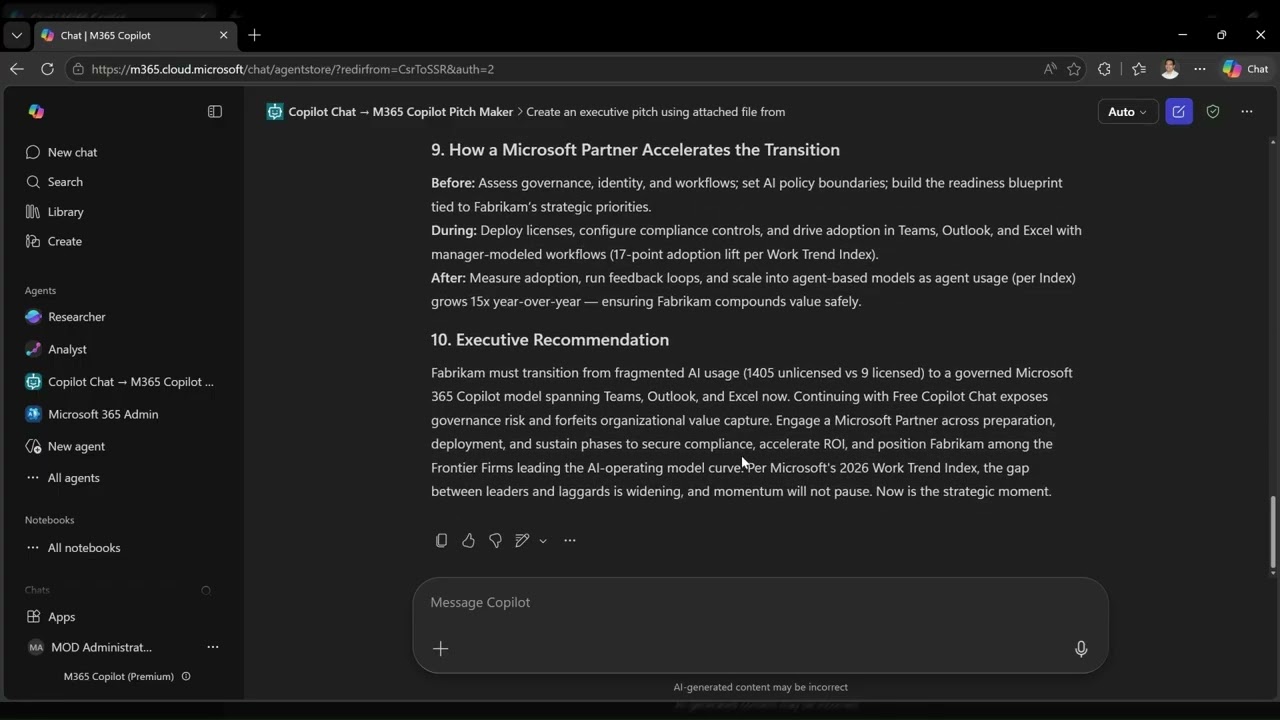
The Agent (BETA) includes a practical partner-led transition path to help customers move from unstructured AI usage to governed business value:
- Before: Assess readiness, governance posture, and priority workflows.
- During: Deploy adoption motions across Teams, Outlook, and Excel with compliance controls in place.
- After: Measure outcomes, refine usage patterns, and scale into broader AI operating models.
The final recommendation clearly explains why an upgrade is required now, what risk is mitigated, and what value is unlocked. Every interaction is designed to end with direction, clarity, and a practical next step for partner-led engagement.
The image below shows an example of the generated pitch output from the Agent (BETA).

This Agent (BETA) helps partners move faster, improve advisory quality, and scale consistency. It shortens pitch preparation from days/weeks to minutes, translates raw data into business narratives, supports value-led customer positioning, and accelerates Microsoft 365 Copilot adoption planning and execution.
The Agent (BETA) is purpose-built for a specific customer value motion, grounded in real partner scenarios, and designed to combine insight, narrative, and recommendation in one end-to-end flow. It produces executive-ready output that reflects strong consulting structure while remaining practical for day-to-day field use.
Customers are already using free Copilot Chat. The opportunity is no longer simple AI experimentation; it is enabling governed, organization-wide transformation.
This Agent (BETA) helps partners identify opportunity, structure high-quality conversations, and drive meaningful action.
From AI experimentation to governed, organization-wide transformation.
For setup, deployment, and execution details, see the run guide.