



This is a LDAP Plugin for the Zope Pluggable Authentication Service (PAS).
pas.plugins.ldap is not releated to the old LDAPUserFolder / LDAPMultiPlugins and the packages (i.e. PloneLDAP) stacked on top of it in any way.
It is based on node.ext.ldap, an almost framework independent LDAP stack.
- If Plone is installed an integration layer with a setup profile and a Plone Controlpanel page is available.
- It works in a plain Zope even if it depends on PlonePAS.
- LDAP authentication and authorization for users and groups.
- It provides users and/or groups from an LDAP directory.
- LDAP properties for users and groups, which can be used in the rest of the system as well.
- For now users and groups can't be added or deleted. Properties on both are read/write.
For a detailed list of TODO tasks to this project, please checkout the TODO file.
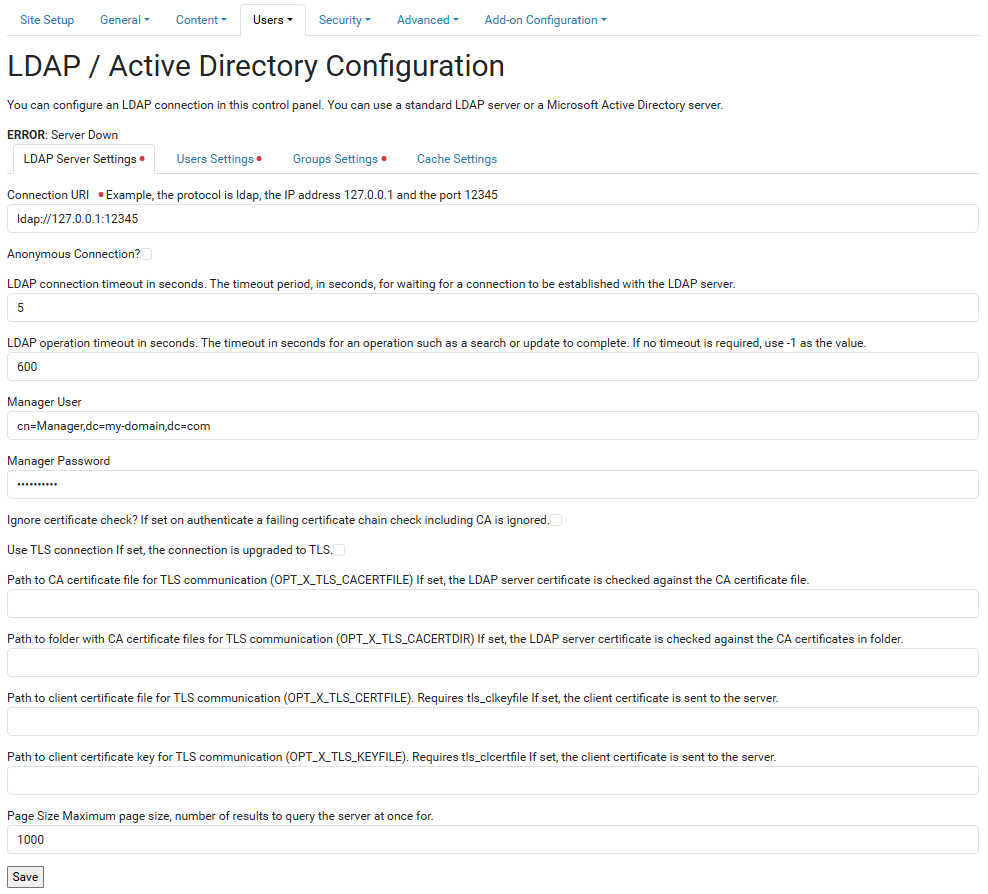
After installation, you will find a new behavior available, go to Site Setup > Users > LDAP / AD Support as the following screenshot:
This product has been translated into
- English
- Spanish
This package supports Zope applications and Plone sites using Volto and Classic UI.
This package depends on python-ldap package.
To build it correctly you need to have some development libraries included in your system.
On a Debian-based installation use:
sudo apt install python-dev libldap2-dev libsasl2-dev libssl-devInstall pas.plugins.ldap by adding it to the instance section of your buildout:
eggs =
    ...
    pas.plugins.ldap

zcml =
    ...
    pas.plugins.ldap
Run buildout and then restart the Zope instance.
Then browse to your acl_users folder and add an LDAP Plugin object.
Configure it using the LDAP Settings form and choose the functionality this
LDAP Plugin will perform with the Activate tab.
- Authentication (
authenticateCredentials) - Group_Enumeration (
enumerateGroups) - Group_Introspection (
getGroupById) - Group_Management (
addGroup) - Groups (
getGroupsForPrincipal) - Properties (
getPropertiesForUser) - Roles (
getRolesForPrincipal) - User_Adder (
doAddUser) - User_Enumeration (
enumerateUsers) - User_Management (
doChangeUser)
To install pas.plugins.ldap in a Plone site, you need by adding it to the
instance section of your buildout:
eggs =
    ...
    pas.plugins.ldap
Run buildout and then restart the Plone instance.
Then go to the Plone control-panel, select Addons and install the LDAP / Active Directory Support.
So, you can navigate to Site Setup > Users > LDAP / AD Support and click it and configure the plugin there.
To use an own integration-profile, add to the profiles metadata.xml file:
...
<dependencies>
    ...
    <dependency>profile-pas.plugins.ldap.plonecontrolpanel:default</dependency>
</dependencies>
...
Additionally the LDAP Settings can be exported and imported with portal_setup tool.
You can place the exported ldapsettings.xml file in your integration profile, so it will be imported with your next install again.
Warning:
The LDAP-password is stored in there in plain text!
But anonymous bindings are possible.
To get detailed output of all LDAP-operations and much more set the logging level to debug. Attention, this is lots of output.
LDAP as an external service might be down, non-responsive or slow. This package logs such events to raise awareness. There are two environment variables to control the logging of LDAP-errors:
PAS_PLUGINS_LDAP_ERROR_LOG_TIMEOUT- First LDAP-error is logged, further errors ignored until the given number of seconds have passed. This supresses flooding logs if LDAP is down. Default: 300.0 (time in seconds, float).
PAS_PLUGINS_LDAP_LONG_RUNNING_LOG_THRESHOLD- Log long running LDAP/PAS operations. If a PAS operation takes longer than he given number of seconds, log it as error. Default: 5 (time in seconds, float).
Global LDAP timeouts are set and controlled by two environment variables:
PAS_PLUGINS_LDAP_OPT_NETWORK_TIMEOUT- Connection timeout. Default: 1.0s
PAS_PLUGINS_LDAP_OPT_TIMEOUT- Overall timeout. Default: 30.0s
See details in python-ldap documentation: OPT_NETWORK_TIMEOUT and OPT_TIMEOUT.
Without caching this module is slow (as any other module talking to LDAP will be).
By default the LDAP-queries are not cached.
A must have for a production environment is having memcached server configured as LDAP query cache.
Cache at least for ~6 seconds, so a page load with all its resources is covered also in worst case.
The UGM tree is cached by default on the request, that means its built up every request from (cached) ldap queries.
There is an alternative adapter available which will cache the ugm tree as volatile attribute (_v_...) on the persistent plugin.
Volatile attributes are not persisted in the ZODB.
If the plugin object vanishes from ZODB cache the atrribute is gone.
The volatile plugin cache can be activated by loading its zcml with <include package="pas.plugins.ldap" file="cache_volatile.zcml".
The caching time can be influenced by overriding the value in pas.plugins.ldap.cache.VOLATILE_CACHE_MAXAGE.
It defaults to 10 and its unit is seconds.
Note:
Caching the UGM tree longer than one request means it could contain outdated data.
If you plan a different implementation of UGM tree caching,provide your own adapter implementing pas.plugins.ldap.interfaces.IPluginCacheHandler.
This package was not tested/developed with Windows. It may work under Windows if python-ldap is installed properly and recognized by buildout.
This package works fine for several 10000 users or groups, unless you list users.
This is not that much a problem for small amount of users. There is room for future optimization in the underlying node.ext.ldap.
- Install requirements:
make install- Start Zope instance:
make zope-start- Zpretty format and lint code:
make zpretty-check && make zpretty-format && make zpretty-check- Isort format and lint code:
make isort-check && make isort-format && make isort-check- Black format and lint code:
make black-check && make black-format && make black-check- Extract i18n messages:
make gettext-create && make gettext-update && make gettext-compile- Run unit tests:
make test- Run coverage unit tests:
make coverageIf you want to help with the development (improvement, update, bug-fixing, ...) of pas.plugins.ldap this is a great idea!
- The code is located in the GitHub Collective.
- You can clone it or get access to the GitHub Collective and work directly on the project.
This product was developed by BlueDynamics Alliance team.

Maintainers are Robert Niederreiter, Jens Klein and the BlueDynamics Alliance developer team.
We appreciate any contribution and if a release is needed to be done on pypi, please just contact one of us: dev@bluedynamics dot com.
- If you are having issues, please let us know at our issue tracker.
For a list of all contributors to this project, please checkout the following resources:
- The CONTRIBUTORS file.
- The Contributors page on GitHub.
The project is licensed under the GPLv2.