Pinned task quick-nav in the detail view (filter-aware)#630
Conversation


Add a compact pill bar at the top of the task detail view for hopping
between the tasks you're currently focused on — your pinned tasks —
without leaving the detail view. It respects the board's active filter,
so a board filtered to "[projectX]" surfaces only projectX's pins, not
every pin across the board.

- New DetailModel pinned quick-nav: PinnedNavItem + SetPinnedNav, a
  windowed single-line pill bar rendered in the header (so viewSignature
  captures it and the render cache stays correct). The bar hides when
  there's nowhere to hop (no pins, or the only pin is the current task),
  and grows headerHeight by one line when shown so the viewport reflows.
- Keys in the detail view: [ / ] cycle prev/next pinned task (wrapping),
  1-9 jump directly to that pill. Navigation reuses the existing
  prev/next transition path (CleanupWithoutSaving + loadTask under the
  taskTransitionInProgress guard), which already releases and
  re-acquires the per-task executor flock — so rapidly switching pinned
  tasks never fights over an executor pane.
- AppModel.filteredPinnedTasks applies the same fuzzy filter predicate
  the board uses (scoreTaskForFilter), ordered by status column then ID.
  The bar is refreshed on task open and on task-set changes (pin/unpin).

The reported "multiple ty instances mixing up executor windows" is
already fixed on main by the granular per-task executor flock
(d733659): a second instance opening the SAME task's executor is
refused (shown as busy) while different tasks coexist freely. This
change deliberately routes pinned-nav switching through that same lock
path and adds coverage; no lock changes were needed.

Tests: pinned-nav visibility/wrap/quick-jump, header rendering +
headerHeight, filter-respect (incl. [project] bracket syntax), and an
integration test driving the real updateDetail keypress path.

Co-Authored-By: Claude Opus 4.8 (1M context) <noreply@anthropic.com>

QA evidence — real TUI screenshotsRendered from the actual 1. Pinned quick-nav bar in the detail view (unfiltered)All 5 pinned tasks show as numbered pills, the current one ( 2. Same view with the board filtered to
|
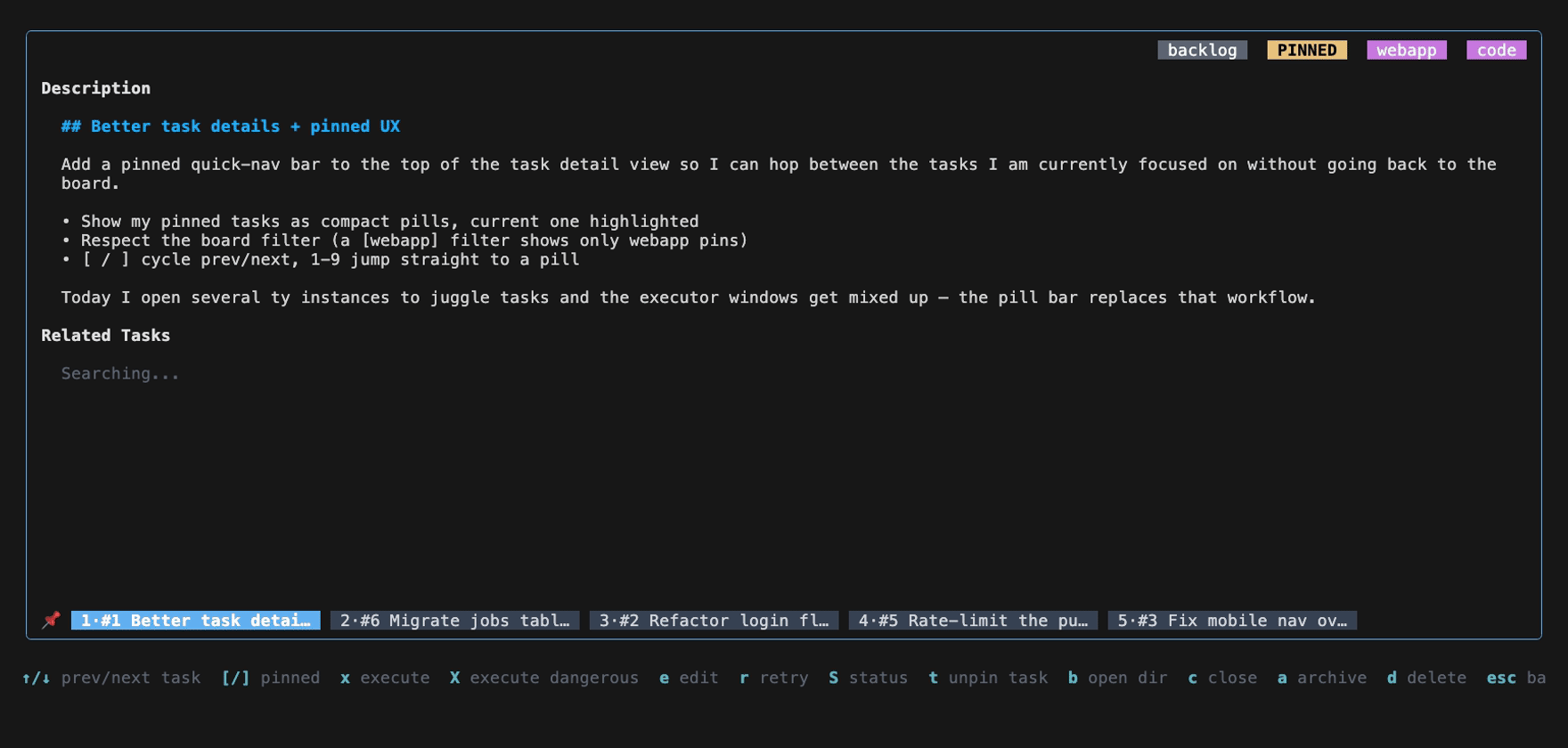
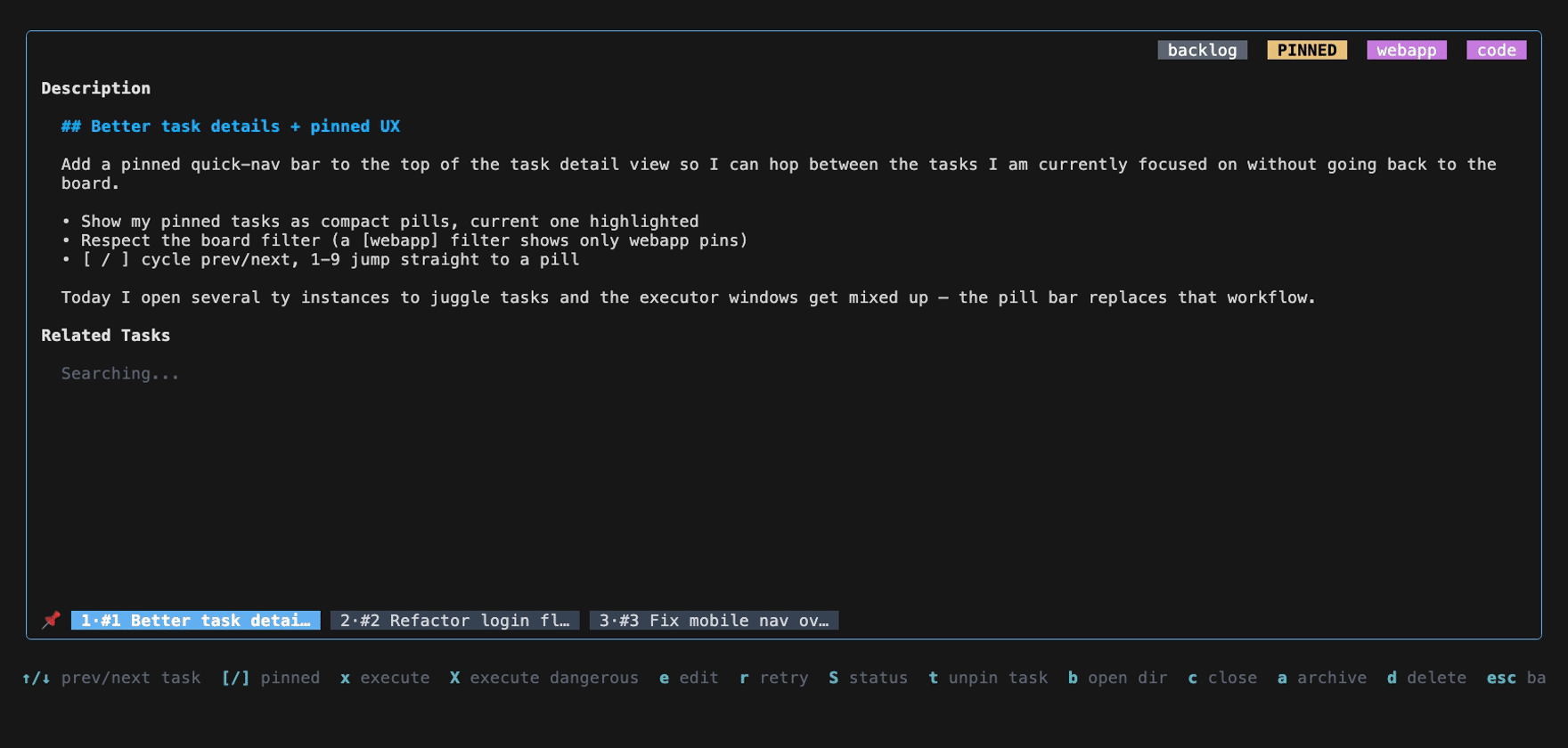
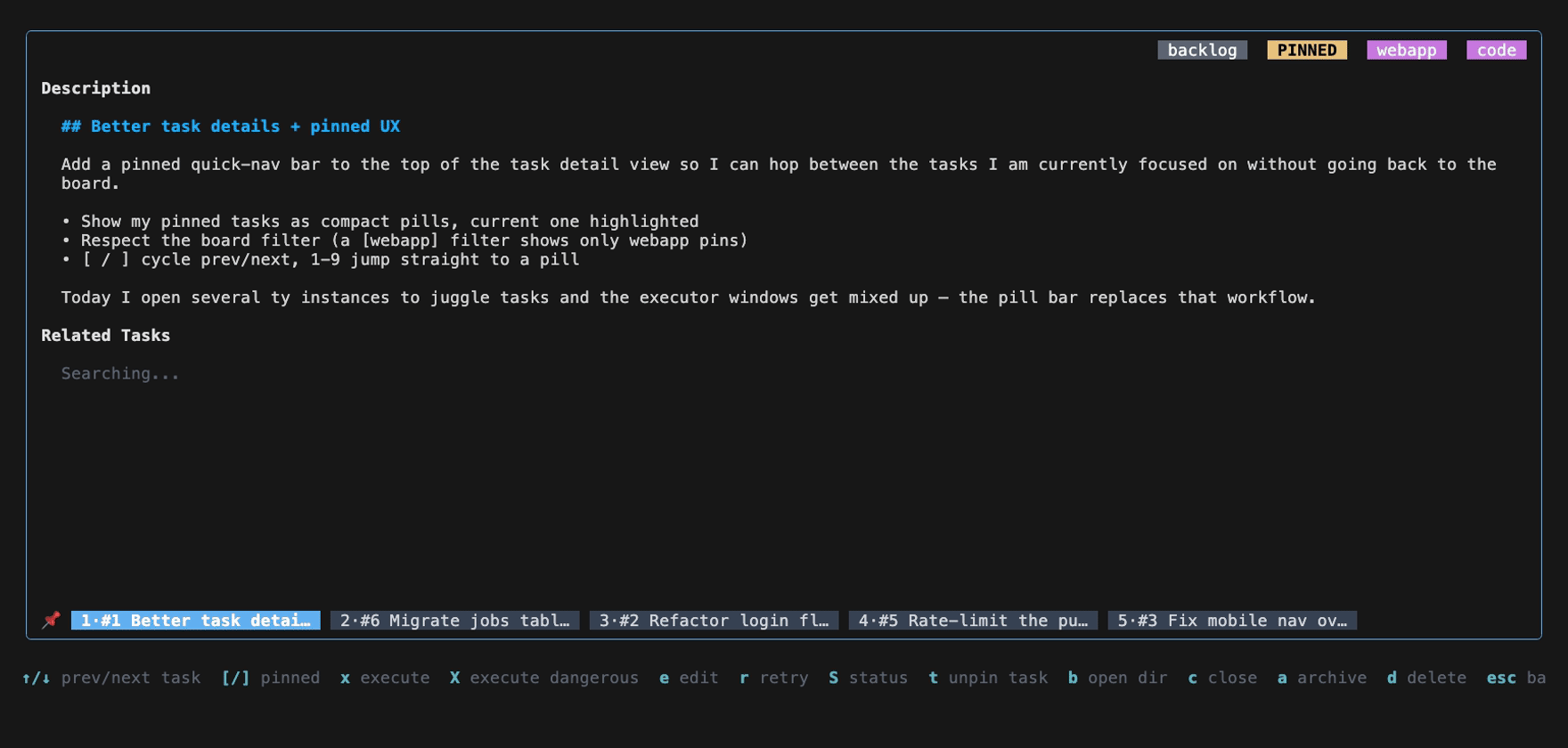
Per design feedback, render the pinned quick-nav pill bar at the bottom
of the detail view (just above the help footer) instead of the top, so
the top stays clean (status/badges). The reserved chrome line already
accounted for by headerHeight() is unchanged — only the render position
moves — and the bar is now folded into viewSignature directly (it's no
longer part of the header string).

Co-Authored-By: Claude Opus 4.8 (1M context) <noreply@anthropic.com>
Updated per feedback — pinned bar moved to the bottomMoved the pinned quick-nav pill bar from the top to the bottom of the detail box (just above the help footer), so the top stays clean (status/badges). Commit Unfiltered — all 5 pins at the bottom, current (
|
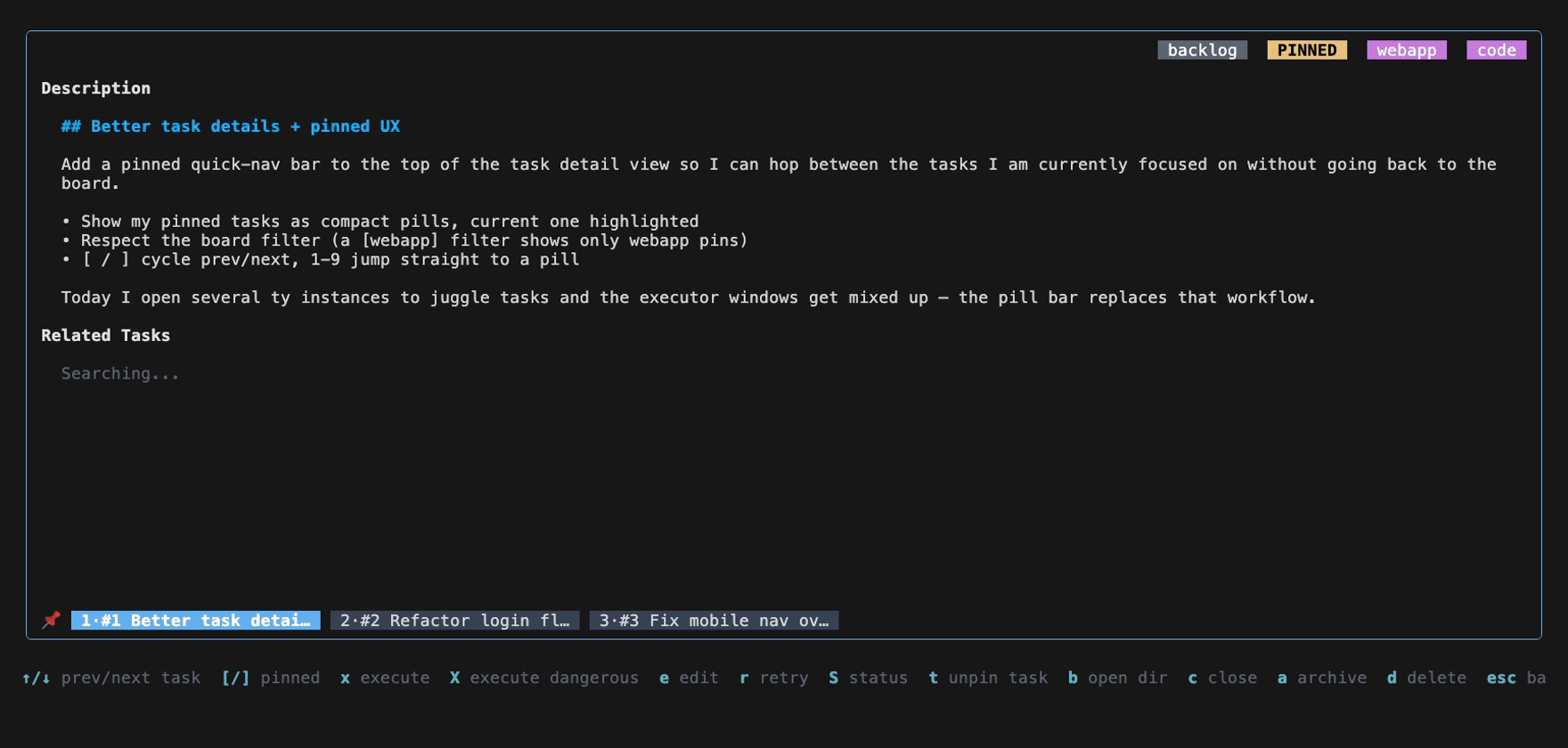
The new PrevPinnedTask/NextPinnedTask keymap actions have no desktop GUI
equivalent, so the multi-surface parity gate (internal/parity) failed.
They are keyboard-only affordances ([ / ]) for cycling pinned tasks in
the detail view; the desktop GUI switches tasks via its own list UI and
already honors the board filter. Record them as deliberate skips in
parity-ignore.json.

Co-Authored-By: Claude Opus 4.8 (1M context) <noreply@anthropic.com>
…-details-pinned-ux

# Conflicts:
#	parity-ignore.json
1 participant

What & why
When you're heads-down on a few tasks, the detail view made you bounce back to the board to switch between them. This adds a pinned quick-nav pill bar at the top of the task detail view so you can hop between the tasks you're currently focused on — your pinned tasks — without leaving the view.
It respects the board's active filter: if the kanban is filtered to
[projectX], the bar only shows projectX's pinned tasks, not every pin across the board.The bar looks like:
The current task's pill is highlighted. With many pins the bar windows around the current one (
‹N/N›markers) so the active task is always visible and the line never wraps.How to use
In the detail view:
[/]— previous / next pinned task (wraps around)1–9— jump directly to that pillSwitching is instant and reuses the existing prev/next transition path.
The "multiple ty instances mix up executor windows" bug
This was already fixed on
mainby the granular per-task executor flock (d733659c): a secondtyopening the same task's executor is refused (shown as "running in another ty instance") while different tasks coexist freely — exactly the requested behavior. This PR deliberately routes pinned-nav task-switching through that same lock/cleanup path (so rapidly hopping between pins never fights over a pane) and adds regression coverage. No lock changes were required.Implementation notes
internal/ui/detail_pinned_nav.go—PinnedNavItem,SetPinnedNav, the windowed pill renderer, and next/prev/nth-jump helpers. The bar renders insiderenderHeader()soviewSignaturecaptures it and the render cache stays correct;headerHeight()grows by one line when the bar shows so the viewport reflows.internal/ui/detail.go— header/viewport wiring; help hint ([/] pinned).internal/ui/app.go—filteredPinnedTasks()reuses the board'sscoreTaskForFilterpredicate;jumpToPinnedTask();[/]+ digit handling inupdateDetail; nav refreshed on task open and on task-set changes (pin/unpin). NewPrevPinnedTask/NextPinnedTaskkeybindings.Tests
headerHeight.filteredPinnedTasksrespects the filter, including[project]bracket syntax.updateDetailkeypress path (]and a digit both begin the transition + return aloadTaskcommand).go test ./internal/ui/…green,golangci-lint run(v2.8.0, matching CI) clean,gofmtclean.🤖 Generated with Claude Code