Local web UI for the pi coding agent. pi-web reads your local pi session files and gives you a browser workspace for session browsing, real-time chat, model configuration, skill management, and project file preview.
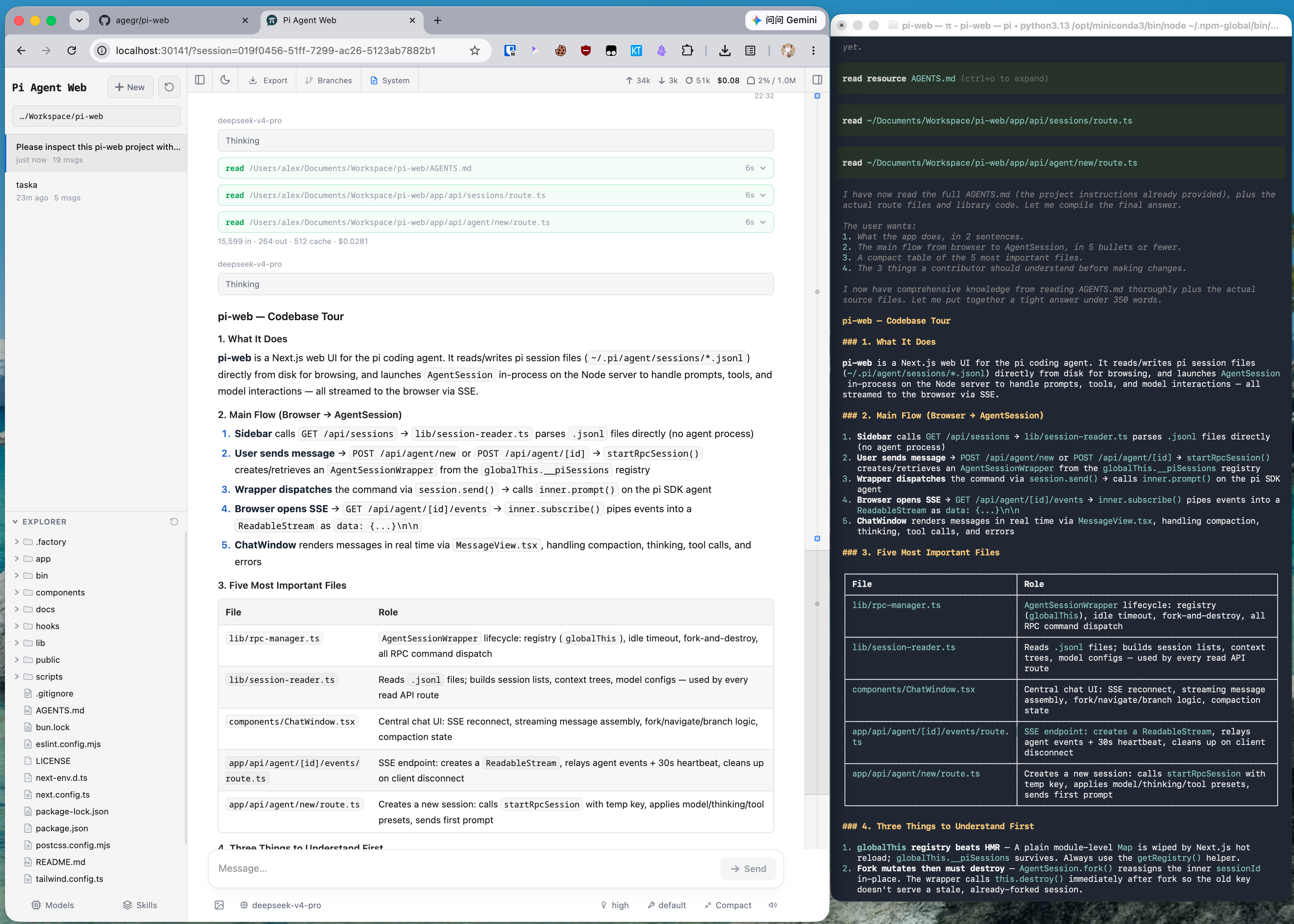
The same pi session in CLI and pi-web: structured tool calls, readable Markdown, session browsing, and cleaner results.
Run without installing:
npx @agegr/pi-web@latestOr install globally:
npm install -g @agegr/pi-web
pi-web
Then open http://localhost:30141. The CLI will try to open the browser automatically after the server is ready.
Options:
pi-web --port 8080              # custom port
pi-web --hostname 127.0.0.1     # local access only
pi-web -p 8080 -H 127.0.0.1     # combine options

PORT=8080 pi-web # environment variable is also supported- Pick work back up: browse previous pi conversations by project without digging through terminal history or session paths.
- Try different directions safely: continue from an earlier message or fork a session into a separate route.
- Chat beside the project: browse files on the left and preview source, docs, images, audio, and PDFs on the right while the agent works.
- See session state clearly: context usage, cost, compaction state, and system prompt details are visible from the top bar.
- Configure less from the terminal: manage models, login/API keys, model tests, and skill switches from the web UI.
- Data directory: pi-web reads
~/.pi/agent/sessionsby default. SetPI_CODING_AGENT_DIRto point at another pi agent directory. - Session files: files are stored as
~/.pi/agent/sessions/<encoded-cwd>/<timestamp>_<uuid>.jsonl. - Model config: the Models panel reads and writes
models.jsonin the pi agent directory. Model lists and defaults come from pi's config. - File access: file browsing and preview are scoped to the selected project directory and working directories that appear in sessions.
- Forks vs in-session branches: Fork creates a new
.jsonlfile. "Edit from here" creates another branch inside the same session file.
npm install
npm run dev
The local dev server runs at http://localhost:30141.
Common checks:
node_modules/.bin/tsc --noEmit
npm run lint
Avoid running next build / npm run build during local development. It writes to .next/ and can interfere with the dev server; leave builds for release work.
app/
  api/
    agent/          # creates/drives AgentSession and exposes SSE events
    auth/           # OAuth and API key management
    cwd/validate/   # custom working directory validation
    default-cwd/    # pi default working directory lookup
    files/          # file listing, reading, preview, and watching
    home/           # current user home directory
    models/         # available models, default model, thinking levels
    models-config/  # read/write models.json and test models
    sessions/       # session reads, rename, delete, context, HTML export
    skills/         # skill listing, search, install, enable/disable
components/
  AppShell.tsx        # main layout, URL state, top panels, file tabs
  SessionSidebar.tsx  # project selector, session tree, Explorer
  ChatWindow.tsx      # messages, SSE, image drag/drop, minimap
  ChatInput.tsx       # input bar, model/tools/thinking/compact/slash controls
  MessageView.tsx     # message, thinking, tool call/result rendering
  ModelsConfig.tsx    # model and auth configuration panel
  SkillsConfig.tsx    # skill management panel
  FileExplorer.tsx    # file tree
  FileViewer.tsx      # source, diff, image, audio, PDF, DOCX preview
lib/
  rpc-manager.ts      # AgentSessionWrapper lifecycle and global registry
  session-reader.ts   # parses .jsonl session files and branch contexts
  normalize.ts        # normalizes toolCall field names
  file-access.ts      # file read safety boundary
  file-paths.ts       # path encoding and relative path helpers
  markdown.ts         # Markdown/Mermaid/KaTeX plugin configuration
  pi-types.ts         # pi-related types
hooks/
  useAgentSession.ts  # session loading, command sending, SSE state machine
  useAudio.ts         # completion sound
  useDragDrop.ts      # image drag/drop
  useTheme.ts         # theme switching
bin/
  pi-web.js           # npm CLI entrypoint