Note: This is the original s-blog project, which has now been migrated and renamed to Spage.


Preview:
- Tech Stack: React 19, Vite, TypeScript, Rust (build engine)
- Content: Markdown-based posts (Hexo-compatible frontmatter)
- Features:
- Instant Search
- Archives (Year/Month)
- Tags & Categories
- i18n Support (English, Chinese, Japanese)
- Photo Albums with EXIF metadata
- SEO (sitemap, RSS, Open Graph, JSON-LD)
- Styling: Clean, responsive design with Tailwind CSS
- Performance: Static site generation with Rust-powered build pipeline
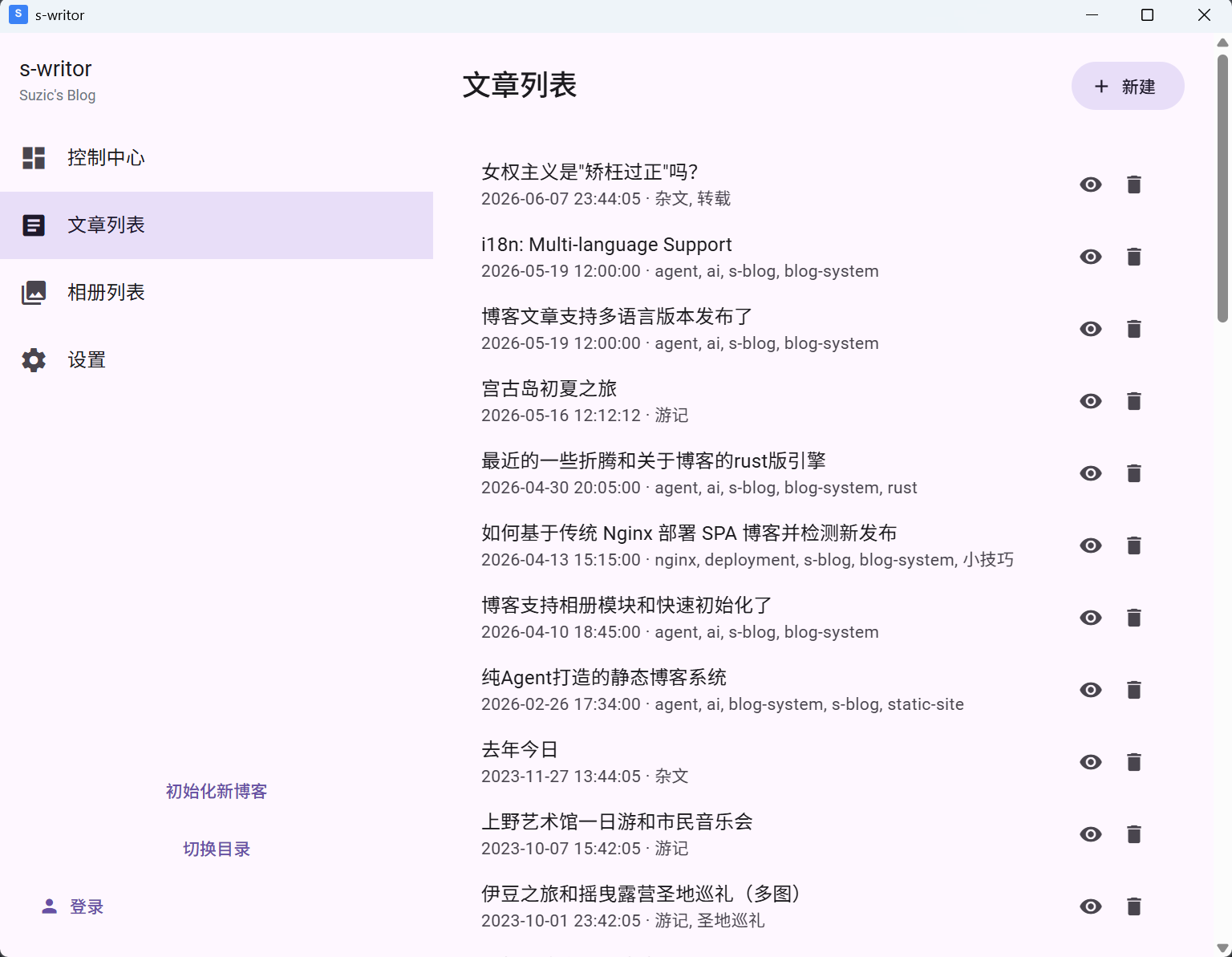
Install the s-writor desktop client directly. It includes full create/manage/preview/build functionality, and will integrate one-click publishing in the future (you only need to apply for a site prefix to deploy to spage.me).
The fastest way to create a new blog:
npm create spage@latestTip: You can also use
bun create spage@latest my-blogorpnpm create spage my-blog.
The CLI will guide you through project setup. After initialization:
cd my-blog
npm install
npm run devnpm run buildThis single command handles the full pipeline:
- Copies the pre-built App Shell
- Generates posts manifest and copies Markdown files
- Processes album photos (thumbnails + EXIF extraction)
- Generates SEO pages, sitemap.xml, rss.xml, robots.txt
The output is a fully static site in dist/. Deploy it to any static hosting.
npm update @s-page/core @s-page/engineYou only maintain your content files (posts/, config.json, album.config.json, albums/, public/). Framework updates are delivered through packages.
Disclaimer: All code in this system was generated by AI.
spage is published as three npm packages:
| Package | Purpose |
|---|---|
@s-page/core |
Pre-built App Shell, UI components, routing, styles, JSON schemas |
@s-page/engine |
Rust-powered build engine — Markdown parsing, image processing, SEO generation, dev server |
create-spage |
CLI scaffolding tool — npm create spage |
Your project only contains content and configuration:
my-blog/
├── posts/              # Markdown posts
├── albums/             # Photo albums (optional)
├── public/             # Static assets (logo, favicon)
├── config.json         # Site configuration
├── album.config.json   # Album configuration
└── package.json
{
  "title": "My Blog",
  "description": "A personal blog",
  "logo": "/logo.png",
  "favicon": "/favicon.ico",
  "siteUrl": "https://example.com",
  "author": "Your Name",
  "language": "en",
  "timezone": "Asia/Tokyo",
  "links": {
    "enabled": true,
    "items": {
      "Friend Blog": "https://example.com"
    }
  },
  "socialLinks": {
    "enabled": true,
    "items": [
      { "platform": "rss" },
      { "platform": "github", "url": "https://github.com/username/repo" },
      { "platform": "x", "url": "https://x.com/username" },
      { "platform": "custom", "url": "https://example.com", "icon": "/icons/my-icon.png", "label": "My Site" }
    ]
  }
}| Field | Required | Description |
|---|---|---|
title |
Yes | Website title |
description |
Yes | Website description |
logo |
Yes | Logo image path |
favicon |
Yes | Favicon path |
siteUrl |
No | Production URL. Required for SEO features (sitemap, RSS, Open Graph) |
author |
No | Author name for SEO metadata |
language |
No | Default language code (en, zh-CN, ja). Affects i18n fallback behavior |
timezone |
No | IANA timezone (e.g., Asia/Shanghai). Ensures correct post dates when building on CI |
basePath |
No | Sub-directory deployment path (e.g., /blog). Defaults to / |
links |
No | Friend links widget (see below) |
socialLinks |
No | Social icon links widget (see below) |
Displays a list of text links in the right sidebar (desktop) or footer (mobile).
| Field | Required | Description |
|---|---|---|
links.enabled |
Yes | Toggle the links widget on/off |
links.items |
Yes | Key-value pairs: { "Display Name": "URL" } |
Displays a row of icon links. Built-in platforms: github, rss, x, twitter, weibo, zhihu, bilibili, email, facebook, instagram, tiktok.
| Field | Required | Description |
|---|---|---|
socialLinks.enabled |
Yes | Toggle the social links widget on/off |
socialLinks.items |
Yes | Array of social link items |
items[].platform |
Yes | Platform name (built-in) or "custom" for custom icons |
items[].url |
Depends | URL to link to. Optional for rss (auto-derived from siteUrl), required for others |
items[].icon |
No | Custom icon image path. Used when platform is "custom" or unrecognized |
items[].label |
No | Tooltip text. Defaults to platform name |
Note: If
platformis"rss"andurlis omitted, the URL is automatically set to{siteUrl}/rss.xml. IfsiteUrlis not configured, the RSS item will not be rendered.
{
  "enabled": true,
  "albums": [
    { "dir": "travel-2024", "name": "2024 Travel", "cover": "cover.jpg" },
    { "dir": "日常", "cover": "best.jpg" }
  ]
}| Field | Required | Description |
|---|---|---|
enabled |
Yes | Toggle the entire album module on/off |
albums[].dir |
Yes | Directory name under albums/. Supports letters, numbers, hyphens, underscores, CJK characters |
albums[].name |
No | Display name. Defaults to dir |
albums[].cover |
No | Cover photo filename. Falls back to the first photo |
Add Markdown files to posts/:
---
title: My Post Title
date: 2024-01-01 12:00:00
tags: [Tech, React]
categories: [Programming]
preview: A short description for post previews.
---To publish a post in multiple languages, use filename suffixes:
posts/
├── About.md          # Default (matches site language or English)
├── About.zh-CN.md    # Chinese version
└── About.ja.md       # Japanese version
The system automatically detects available languages and shows a fallback notice when a localized version is unavailable.
Place photos in albums/{dirname}/. Supported formats: .jpg, .jpeg, .png, .webp
The build process automatically:
- Generates WebP thumbnails (max 1080px)
- Extracts EXIF metadata (camera, lens, aperture, shutter speed, ISO)
- Produces JSON index files
Thumbnails are generated incrementally — unchanged photos are skipped.
For large album collections, you can offload original photos to S3-compatible storage (Cloudflare R2, AWS S3, Backblaze B2, MinIO) while keeping lightweight thumbnails in your deployment.
- Add a
providerblock toalbum.config.json:
- Create
.envwith your credentials:
S3_ACCESS_KEY=your-access-key-id
S3_SECRET_KEY=your-secret-access-key
# Upload originals + thumbnails + index JSON to S3
spage sync --media
# Preview what would be uploaded
spage sync --media --dry-run| Mode | Behavior |
|---|---|
| No provider (default) | Original photos are copied to dist/. Standard static hosting. |
Provider + local albums/ |
Thumbnails generated locally. Originals served from CDN (publicUrl). |
Provider + no local albums/ (CI) |
Thumbnails and JSON pulled from S3. No local photos needed. |
When using a provider, you don't need to commit photos to git:
# .github/workflows/deploy.yml
env:
S3_ACCESS_KEY: ${{ secrets.S3_ACCESS_KEY }}
S3_SECRET_KEY: ${{ secrets.S3_SECRET_KEY }}
steps:
- uses: actions/checkout@v4
- run: npm install
- run: npx spage build # Pulls thumbnails from S3 automatically
- run: # deploy dist/The sync lock file (.spage-sync.lock) should be committed to git — it tracks which files have been uploaded.
sync --media uses a hybrid fingerprint strategy to avoid re-uploading unchanged files:
- Files ≤ 5MB: SHA-256 content hash
- Files > 5MB: size + modification time
Failed uploads (after 3 retries) are logged and skipped without blocking the rest.
Note: The S3
ListObjectsAPI returns at most 1000 keys per request. If a single album exceeds 1000 photos, only the first 1000 thumbnails will be pulled during CI build. For most blogs this is not a concern.
Display a personal memo/microblog timeline powered by Ech0. Memos are fetched at runtime from your Ech0 instance — no build step required.
- A running Ech0 instance accessible from the browser
Create memo.config.json in your project root:
{
"enabled": true,
"provider": "ech0",
"serverUrl": "https://your-ech0-instance.com",
"pageSize": 20,
"title": "Memo"
}| Field | Required | Description |
|---|---|---|
enabled |
Yes | Toggle the memo module on/off |
provider |
Yes | Data provider. Currently only "ech0" is supported |
serverUrl |
Yes | URL of your Ech0 instance |
pageSize |
No | Number of memos per load. Default: 20 |
title |
No | Custom page title. Falls back to i18n default ("Memo" / "动态" / "メモ") |
When siteUrl is configured, the build automatically generates:
- SEO HTML pages (
dist/post/*/index.html) — Open Graph, Twitter Card, JSON-LD - sitemap.xml — XML sitemap
- rss.xml — RSS 2.0 feed
- robots.txt — Crawler instructions
This project strictly prohibits manual coding. All code must be generated by AI.
- Gemini 3 Pro
- Gemini 3.1 Pro
- Claude Sonnet 4.5
- Claude Opus 4.5
- Claude Opus 4.6
This project is built upon the shoulders of many excellent open-source projects:
{
  "enabled": true,
  "albums": [...],
  "provider": {
    "type": "s3",
    "endpoint": "https://<account_id>.r2.cloudflarestorage.com",
    "region": "auto",
    "bucket": "my-blog-media",
    "publicUrl": "https://media.yourdomain.com"
  }
}